Software / 2026
Quantum Noise Analysis (QNA)
PyQt6 desktop application for quantitative STM noise analysis: (I - I_SET)^2 maps, Site/Set ROI pairs, frame-by-frame analysis, potential-dependent plots and STP export.
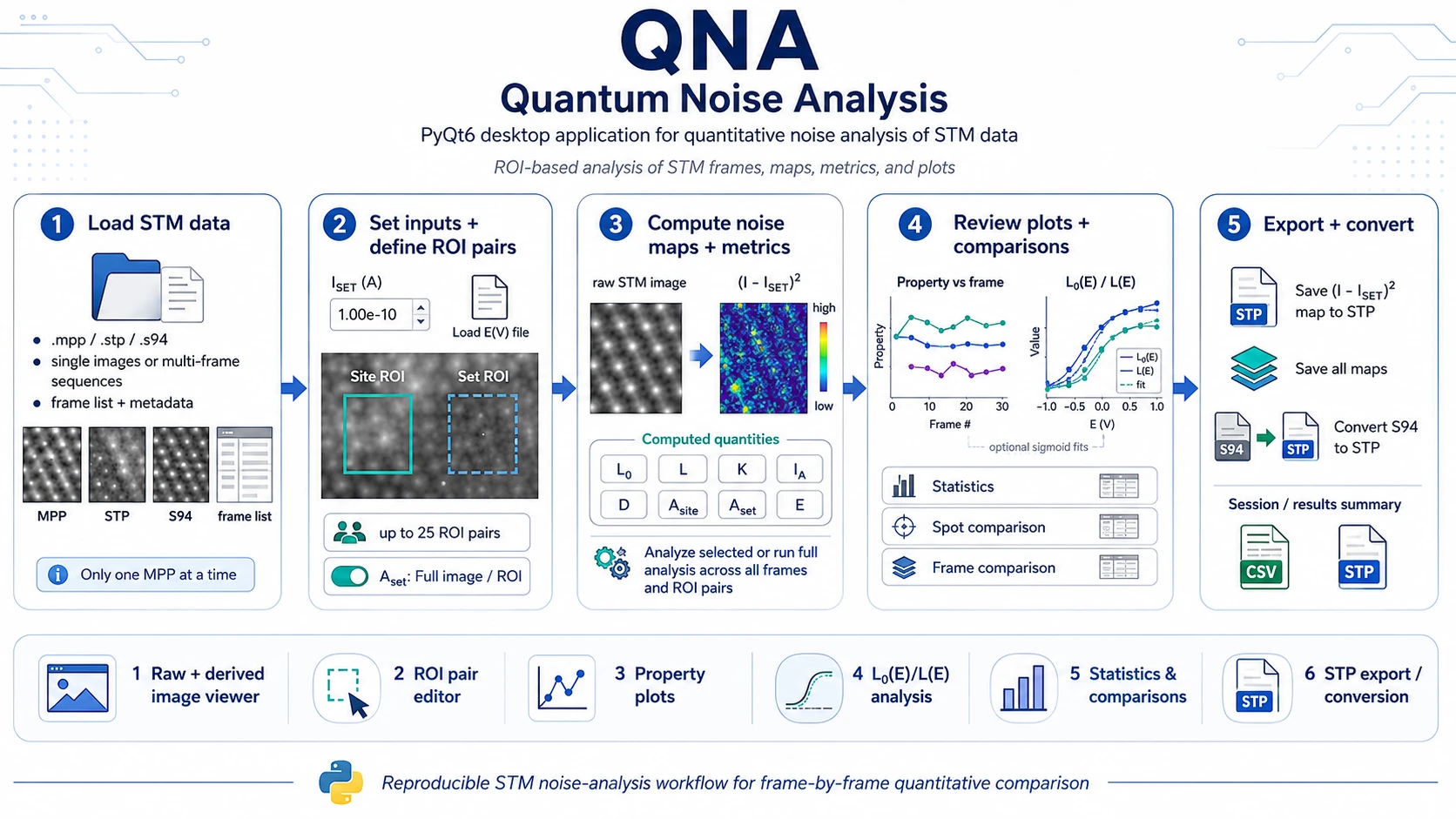
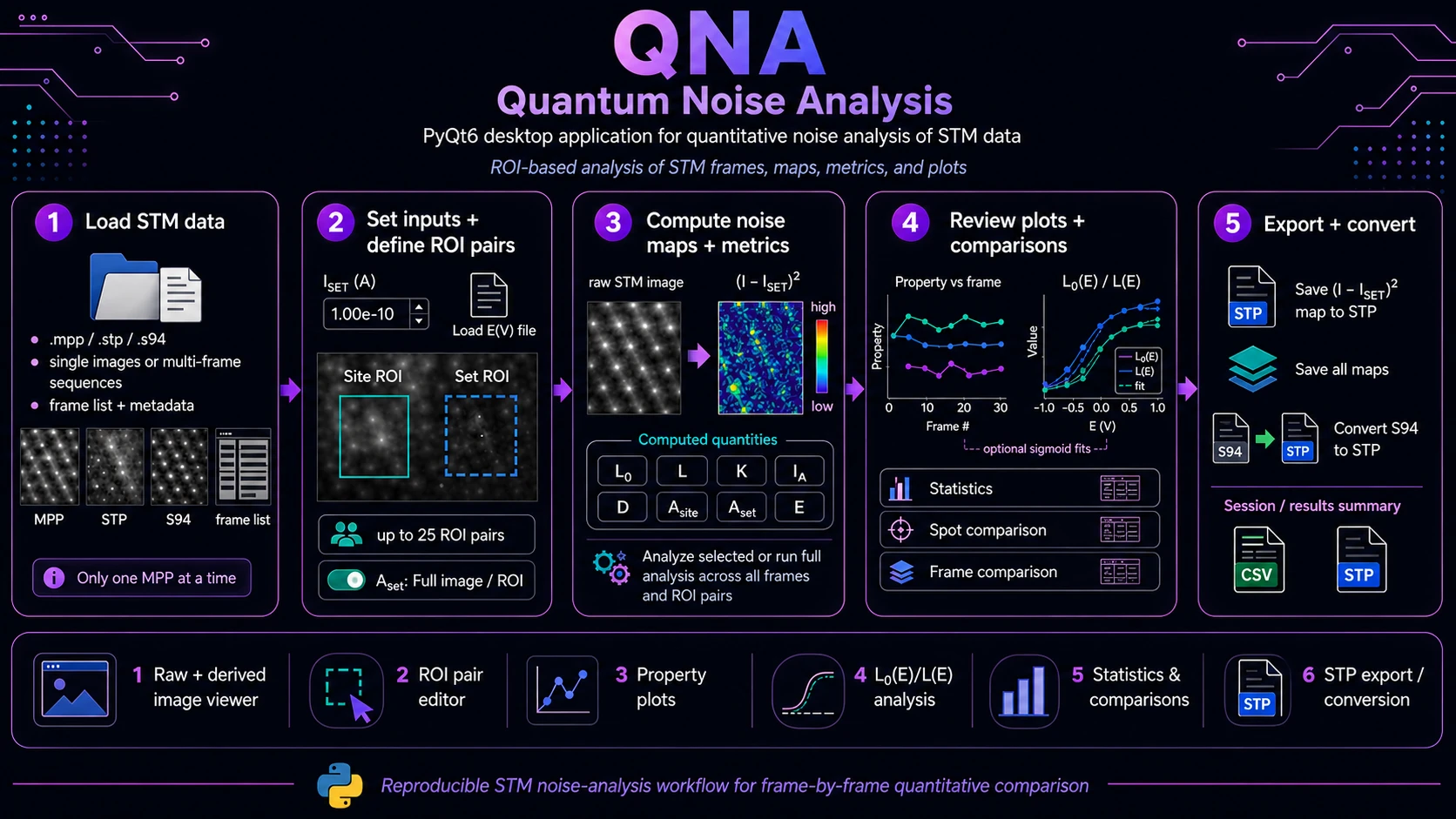
Overview
Quantum Noise Analysis (QNA) is a PyQt6 desktop application for quantitative noise analysis of scanning tunneling microscopy (STM) data. It is designed for frame-by-frame inspection of STM images and ROI-based comparison of local noise metrics across single images, STM frame series and multi-frame MPP datasets.
The application helps the user move from raw STM data to derived noise maps, per-frame metrics, potential-dependent plots, ROI-pair comparisons and STP export in one reproducible desktop workflow.
What QNA Does
QNA focuses on the quantitative analysis of local STM current fluctuations. For each loaded STM entry, the application can generate the derived noise map:
(I - I_SET)^2where I is the image signal and I_SET is the user-defined tunneling-current setpoint. The software then combines this derived map with user-defined ROI geometry and potential values to compute and visualize noise-related quantities across frames.
Main capabilities:
- load STM data from
.mpp,.stpand.s94files, - inspect raw STM frames and derived
(I - I_SET)^2maps, - define multiple named ROI pairs composed of
Site ROIandSet ROI, - compute noise metrics for selected frames or for the full frame list,
- analyze up to 25 ROI pairs in one workflow,
- assign potential values from an external
E(V)text file, - plot metrics versus frame number or potential,
- review statistics, spot comparisons and frame comparisons,
- export derived maps as
.stp, - batch-save all derived maps,
- convert listed
.s94files to.stp.
Supported Data
Input Formats
QNA currently supports:
| Format | Use in QNA |
|---|---|
.mpp | Omicron multi-frame data; used for frame-by-frame analysis. |
.stp | Omicron single STM image. |
.s94 | SPECS STM image; can also be converted to .stp. |
Current Loading Rules
- Data can be loaded through
File -> Open file(s).... - Directories can be loaded through
File -> Open directory...; the current directory loader scans for.stpand.s94files. - Only one
.mppfile can be loaded at a time. - Each MPP frame appears as a separate list entry.
- No example STM datasets are shipped with the repository; users should provide their own STM files.
Core Workflow
1. Load STM Data
Open a single STM file, multiple files or a directory of STM images.
Typical actions:
File -> Open file(s)...
File -> Open directory...
Loaded entries appear in the left panel. The list can be filtered by file type: All, STP, S94 or MPP.
2. Set Analysis Inputs
Set the tunneling-current setpoint used for noise-map computation:
I_SET (A)For multi-frame potential-dependent workflows, load an E(V) text file:
Load E(V) fileThe potential file is assigned row-by-row to the current list entries.
3. Define ROI Pairs
QNA uses paired regions of interest:
- Site ROI - local region associated with the site or spot being evaluated.
- Set ROI - reference area used for
A_setwhen ROI mode is enabled.
The application supports multiple named ROI pairs. Only the active pair is editable, which reduces accidental modification during long analyses.
Useful ROI controls include:
- add ROI pair,
- duplicate ROI pair,
- rename ROI pair,
- remove ROI pair,
- lock active pair,
- switch ROI palette for visibility,
- toggle ROI preview,
- choose
A_set: Full imageorA_set: ROI.
4. Run Analysis
For a single selected entry:
File -> Analyze selected
Ctrl+R
For all entries and all ROI pairs:
File -> Full analysis (all frames)
Ctrl+Shift+R
Full analysis requires:
- at least one ROI pair,
- a
Site ROIfor every pair, - potential values assigned to all loaded entries.
5. Review Maps, Metrics and Plots
After analysis, QNA displays:
- raw STM image,
- derived
(I - I_SET)^2map, - ROI preview,
- active-frame metrics,
- property plot versus frame,
L0(E) / L(E)plot,- statistics across frames,
- spot comparison table,
- frame comparison plot or heatmap.
6. Export and Convert
Export actions are available from the File menu:
Save (I - I_SET)^2 map to .stp
Save all (I - I_SET)^2 maps to .stp
Convert S94 to STP (from list)
Current export support is centered on STP map export and S94-to-STP conversion. Native project/session saving and table export are not the primary implemented export path in the current codebase.
Computed Quantities
QNA computes and displays the following analysis quantities:
| Quantity | Meaning in the QNA workflow |
|---|---|
L0 | Noise-related baseline quantity derived from the (I - I_SET)^2 map and ROI/area normalization. |
L | Corrected/faradic noise-related quantity derived from L0, offset and correction factor. |
K | Correction factor based on the difference between mean current and I_SET. |
I_A | Mean current over the selected reference area. |
D | Area ratio between A_site and A_set. |
A_site | Physical or pixel area of the Site ROI. |
A_set | Full-image area or Set ROI area, depending on the selected mode. |
E | Potential value assigned to the frame. |
When physical scan dimensions are available in metadata, areas are reported in nm². Otherwise, QNA falls back to pixel units.
Plotting and Comparison Views
Property vs Frame
The Property vs frame plot shows selected metrics across the loaded frame list. Available metric choices include:
L0,L,K,I_A,D,E,A_site,A_set.
The view is useful for checking frame-to-frame trends, outliers, unstable ROIs or potential-dependent changes.
L0(E) / L(E)
The L0(E) / L(E) view plots noise-related quantities as a function of potential. The user can choose the visible series:
L0 + L,L0 only,L only.
When SciPy is available and enough valid data points exist, QNA can compute optional sigmoid fits and display fit-related parameters such as E_inf and E_on.
Statistics Across Frames
The statistics view summarizes the active ROI pair across the loaded frame sequence, including metrics such as:
L0,L,D,I_A,K,A_site,A_set,- fit-derived values when available.
Spot Comparison
Spot comparison is intended for workflows with multiple ROI pairs. It helps compare active sites or candidate spots using fitted and summary quantities, including dL, E_on and L0/L statistics.
Frame Comparison
Frame comparison provides all-frame review across all ROI pairs. It is useful for checking whether trends are shared by multiple sites or localized to a specific ROI.
E(V) File Format
The potential file should be a plain text file with two whitespace-separated columns and no header:
1 0.100
2 0.125
3 0.150
Rules:
- column 1: frame index,
- column 2: potential value
E(V), - row order is used to assign potentials to the current list entries,
- the number of rows must match the number of loaded entries.
Typical Use Cases
Single-Image Noise Inspection
Use QNA to analyze a single .stp, .s94 or selected MPP frame.
Workflow:
- Load one or more STM files.
- Select the entry to inspect.
- Set
I_SET (A). - Define a
Site ROIand optionally aSet ROI. - Choose
A_set: Full imageorA_set: ROI. - Run
Analyze selected. - Inspect the derived
(I - I_SET)^2map and active metrics. - Export the derived map to
.stpif needed.
This mode is useful for quick inspection of a single active site, checking whether a local region shows elevated noise and preparing derived maps for external STM/SPM tools.
Multi-Frame MPP Analysis
Use QNA for potential-dependent analysis across an MPP frame sequence.
Workflow:
- Load one
.mppfile. - Set
I_SET (A). - Load the matching
E(V)text file. - Define one or more ROI pairs.
- Run
Full analysis. - Review
Property vs frameandL0(E) / L(E). - Compare spots using statistics, spot comparison and frame comparison views.
- Export derived maps as
.stpwhen needed.
This mode is intended for frame-by-frame STM noise analysis, comparing potential-dependent behavior between ROI pairs and screening multiple candidate active sites in one STM sequence.
Comparing Multiple Sites
Use multiple ROI pairs to compare sites or spots on the same STM frames. Pairs can be duplicated, renamed for example as spot 1, spot 2, reference, defect or terrace, and then compared using statistics and fit parameters.
STP Export and S94 Conversion
QNA can act as a bridge between SPECS/Omicron STM files and downstream tools that expect STP-compatible data. It supports .s94 to .stp conversion and saving (I - I_SET)^2 maps as .stp.
User Interface Overview
Left Panel
- loaded entries and frames,
- file-type filtering,
- remove selected,
- clear list,
- keyboard navigation through frames.
Center Panel
I_SETinput,E(V)file loader,- potential input for current frame,
- raw/derived image viewer,
- colormap and level controls,
- property and L0/L plots.
ROI Panel
- named ROI pairs,
- add / duplicate / rename / remove,
- lock active pair,
- ROI preview controls,
A_setmode switch.
Analysis Panels
- active metrics,
- statistics across frames,
- spot comparison,
- frame comparison.
Installation and Launch
Python 3.11 is recommended for the current repository state. After creating or activating an environment:
python -m pip install -r requirements.txtOptional SciPy installation for sigmoid fitting:
python -m pip install scipyRun the application:
python -m qna.mainCore dependencies from the repository include:
numpy,PyQt6,pyqtgraph.
Development Status
QNA is an active, focused research tool rather than a frozen commercial application. The current implementation already supports the central STM noise-analysis workflow: loading STM data, ROI-pair definition, derived noise maps, full-frame analysis, potential-dependent plotting, statistics/comparison views and STP export.
Current practical notes:
- one
.mppfile can be loaded at a time, - directory loading currently targets
.stpand.s94, while.mppis loaded through file selection, - sigmoid fitting is optional and depends on SciPy,
- no example STM datasets are bundled with the repository,
- project/session persistence is not the main implemented workflow at this stage,
- export is focused on derived STP maps and S94-to-STP conversion.
Future extensions may include stronger result-table export, session persistence, richer batch reporting and additional QA utilities, depending on project needs.